
POWER TOOL MAINTENANCE
Power tools last longer and work more reliably when basic maintenance becomes part of your routine. You do not need to dismantle motors or perform complicated repairs. For most DIYers, good maintenance means keeping tools clean and dry, checking high-wear parts, caring for batteries correctly, and dealing with damage before the next project.
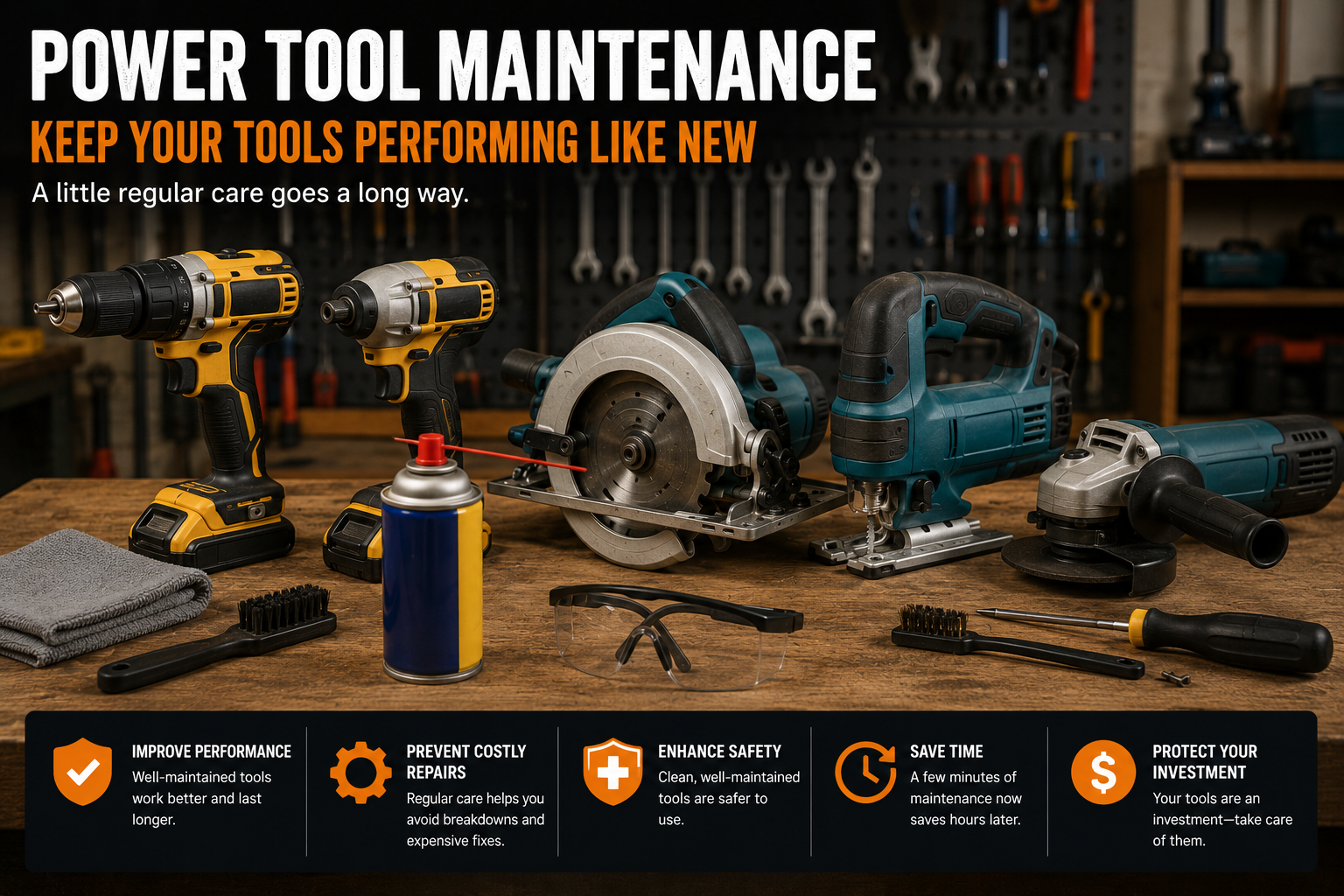
How to Maintain Your Power Tools: Why It Matters
Sawdust, masonry dust, heat, moisture, worn accessories, and damaged cords can all reduce a tool’s reliability. Regular inspection also gives you a chance to spot problems before they become more serious.
Maintenance is not the same as repair. Opening housings, working on internal electrical components, or bypassing safety systems may require qualified service and can affect warranties. OSHA’s hand and power tool safety guidance emphasizes keeping tools in safe condition and addressing hazards before use. This guide focuses on practical maintenance that ordinary DIY users can perform without modifying the tool.
Power Tool Maintenance Checklist
- Disconnect the tool from power before cleaning or inspection.
- Remove loose dust and debris after use.
- Keep ventilation openings clear.
- Inspect cords, plugs, batteries, housings, guards, and switches.
- Check blades, bits, discs, and other accessories for wear or damage.
- Follow manufacturer instructions for lubrication.
- Store tools and batteries in a clean, dry environment.
- Stop using any tool that appears damaged or behaves abnormally.

1. Disconnect Power Before Maintenance
Before cleaning, changing accessories, clearing debris, or inspecting areas near moving parts, unplug corded tools or remove the battery from cordless tools. A trigger lock alone is not a substitute for disconnecting the power source.
This habit is particularly important when working around blades. Our guide on how to change a circular saw blade safely shows the same principle in a practical blade-change procedure.
2. Clean Dust and Debris After Use
Wipe the exterior with a clean cloth and remove loose debris according to the manufacturer’s instructions. Pay particular attention to ventilation openings, guards, adjustment mechanisms, and areas where dust naturally accumulates.
Do not spray cleaners, solvents, water, or lubricants into a tool unless the manufacturer specifically permits it. Some chemicals can damage plastics, seals, electrical insulation, or internal components.
3. Keep Air Vents Clear
Electric motors generate heat, and many power tools rely on airflow through ventilation openings for cooling. Inspect vents regularly and keep them free from packed debris using an approved cleaning method.
If a tool repeatedly becomes unusually hot, smells abnormal, loses power, or produces smoke, stop using it. Cleaning the vents is not a substitute for diagnosing an electrical or mechanical fault.
4. Inspect the Tool Before and After Use
Look over the housing for cracks, missing fasteners, damaged guards, loose handles, or controls that no longer operate normally. On corded tools, inspect the power cord and plug for cuts, exposed conductors, crushed sections, or other damage.
On cordless tools, inspect the battery connection area and battery housing. Do not use a battery that is cracked, swollen, leaking, excessively hot, or otherwise visibly damaged.
5. Check Blades, Bits, Discs, and Accessories
A well-maintained tool can still perform poorly if its accessory is worn, damaged, or inappropriate for the material. Inspect cutting and drilling accessories before use and replace damaged components rather than trying to extend their life.
For circular saws, look for damaged or missing teeth, warping, cracks, and unusual wear. If you are learning saw setup and cutting technique as well, see our How to Use a Circular Saw guide.
For drills and drivers, inspect bits for damage and make sure the chuck or bit holder grips accessories correctly. Our cordless drill beginner’s guide covers correct bit installation and basic setup.

6. Lubricate Only Where the Manufacturer Recommends
More lubricant is not automatically better. Many modern power tools use sealed or factory-lubricated components that are not intended for routine user lubrication.
Check the owner’s manual for lubrication points, lubricant type, quantity, and service interval. Applying the wrong oil or grease can attract dust, contaminate components, or damage materials.
7. Take Care of Cordless Tool Batteries
For a new or replacement pack, read our cordless tool battery guide before choosing capacity or assuming compatibility.
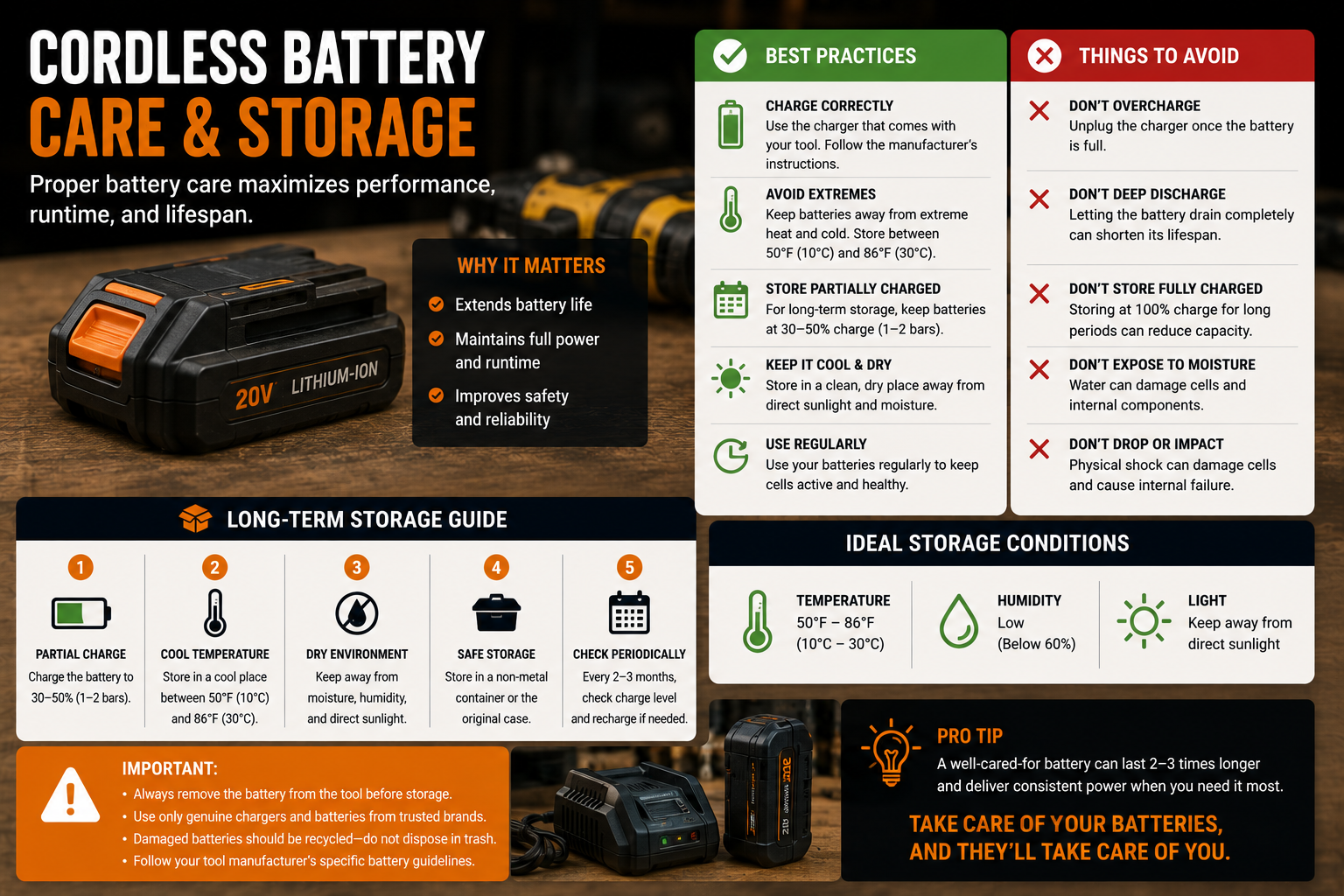
Lithium-ion batteries require less routine maintenance than older battery technologies, but storage and temperature still matter. Use the charger specified by the manufacturer, keep the battery contacts clean and dry, and avoid exposing battery packs to excessive heat, water, impact, or conditions outside the manufacturer’s stated limits.
For longer storage periods, follow the battery manufacturer’s recommended charge level and temperature range. Different battery systems can have different instructions, so avoid applying one universal storage percentage to every pack. If you’re building out a cordless tool setup, our best cordless drills guide can also help you compare current options.
Signs a Battery Needs Attention
- Cracked or damaged casing
- Swelling or deformation
- Leaking material
- Unusual odor
- Excessive heat during normal use or charging
- Repeated charging faults
If you notice these signs, stop using or charging the battery and follow the manufacturer’s guidance for service, transport, and disposal.
8. Store Power Tools Properly
Store tools in a clean, dry location where they are protected from rain, condensation, excessive heat, and accidental impact. A case, cabinet, shelf, or organized tool storage system can also protect cords, guards, and accessories from being crushed or misplaced.
Keep sharp accessories protected and organize batteries so their terminals cannot be accidentally shorted by loose metal objects.
9. Maintain Tool-Specific Safety Parts
Some components deserve special attention because they directly affect safe operation. Circular saw lower guards should move freely and return correctly. Grinder guards should be intact and correctly positioned. Drill auxiliary handles should tighten securely. Sanders should have undamaged pads and dust collection connections.
Never remove or permanently disable a guard because it is inconvenient. If a safety component no longer works correctly, stop using the tool until it has been repaired or replaced appropriately.
10. Replace Wear Parts When Required
Depending on the tool, brushes, belts, pads, filters, blades, bits, discs, and other components may eventually require replacement. Some brushless tools eliminate carbon-brush replacement, but they still require normal inspection and care.
If you’re deciding between motor types for a future drill purchase, our brushless vs brushed drill comparison explains the practical differences.
Use compatible replacement parts and follow the manufacturer’s service procedure. If replacement requires opening electrical housings or performing work beyond the manual’s user-serviceable instructions, use an appropriate service technician.
Maintenance by Power Tool Type
Cordless Drills and Impact Drivers
Keep the chuck or bit holder clean, inspect bits, check the battery interface, and make sure switches and direction controls operate normally. If you’re new to impact tools, our How to Use an Impact Driver guide explains correct setup and use.
Circular Saws and Miter Saws
Inspect blades, blade guards, base plates or fences, adjustment locks, and dust outlets. Remove accumulated sawdust using the method recommended in the manual and confirm that moving guards return correctly.
Jigsaws and Reciprocating Saws
Inspect the blade clamp and shoe, remove debris from the cutting area, and replace bent or damaged blades. For jigsaw setup and blade selection, see our How to Use a Jigsaw guide.
Sanders
Keep dust extraction ports clear, inspect the backing pad, and replace worn abrasives. Empty or clean dust collection components according to the manufacturer’s instructions.
Angle Grinders
Inspect the guard, side handle, spindle hardware, and abrasive accessory before use. Never use cracked or damaged discs, and make sure accessories meet the tool’s size and speed requirements.
Hammer Drills
Remove masonry dust from the exterior and vents, inspect the chuck and auxiliary handle, and check masonry bits for excessive wear. Our hammer drill beginner’s guide covers correct setup and masonry drilling technique.
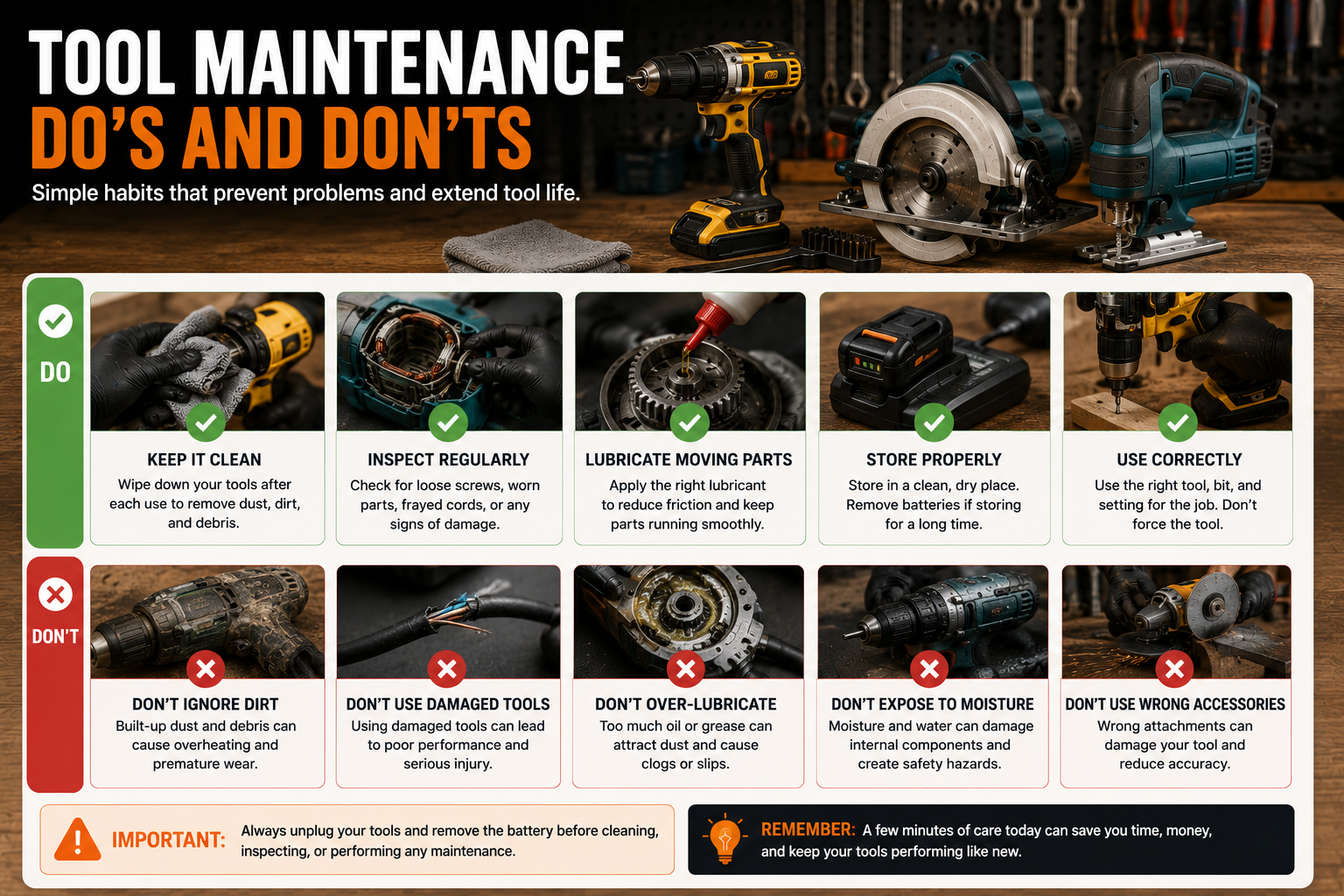
Common Power Tool Maintenance Mistakes
Cleaning a Tool While It Is Connected to Power
Always disconnect the power source first.
Using Too Much Lubricant
Unnecessary oil or grease can attract dust and may harm components. Follow the manual rather than lubricating by habit.
Ignoring Damaged Accessories
A cracked disc, bent blade, damaged bit, or warped saw blade should not be used simply because the tool itself still works.
Storing Batteries in Extreme Temperatures
Follow the battery manufacturer’s recommended storage conditions and avoid locations that become excessively hot or cold.
Ignoring Changes in Sound, Heat, or Vibration
New vibration, grinding sounds, unusual heat, burning smells, smoke, or sudden performance changes are reasons to stop and inspect the tool rather than continue working.
Attempting Repairs Beyond Your Skill Level
Routine maintenance is useful; unsafe electrical or mechanical repairs are not. Use qualified service when the required work goes beyond the manufacturer’s user-serviceable procedures.
How Often Should You Maintain Power Tools?
There is no single maintenance interval that applies to every tool. A circular saw used daily on a dusty jobsite needs attention more frequently than a drill used for occasional household projects.
A practical approach is to perform a quick inspection before use, basic cleaning after dusty or demanding work, and a more thorough inspection periodically based on usage. Always follow any maintenance schedule provided by the manufacturer.
Frequently Asked Questions
Should I oil my power tools?
Only where and when the manufacturer recommends it. Many components are sealed or factory lubricated and do not need routine user-applied oil.
Can I clean power tools with water?
Do not wash electrical power tools with water unless the manufacturer explicitly provides a safe cleaning procedure that allows it. Generally, keep electrical components dry and use the approved cleaning method in the manual.
Can I use compressed air to clean my tools?
Check the tool manufacturer’s instructions first. Compressed air can make fine dust airborne and may drive debris deeper into components. If permitted, use the specified pressure, personal protection, and technique.
How should I store cordless tool batteries?
Store them within the temperature and charge conditions recommended by the battery manufacturer, protected from moisture, excessive heat, physical damage, and conductive objects that could contact the terminals.
How do I know when a power tool needs professional repair?
Stop using the tool if you notice damaged electrical parts, smoke, burning smells, persistent overheating, abnormal vibration or noise, malfunctioning safety components, or faults that cannot be resolved through manufacturer-approved user maintenance.
The Pelstro Bottom Line
You do not need complicated servicing skills to take better care of your tools. Disconnect power, keep tools clean and dry, inspect them regularly, replace damaged accessories, care for batteries properly, and follow the manufacturer’s maintenance instructions. Those habits make it easier to catch wear early and keep your tools ready for the next project.
Continue building better habits with our Pelstro How-To guides.
Pingback: How to Sharpen Drill Bits: Step-by-Step Guide | Pelstro
Pingback: How to Store Power Tools Properly: A Complete Guide - Pelstro